

 9 hours ago
1
9 hours ago
1
PROTECT YOURSELF with Orgo-Life® QUANTUM TECHNOLOGY
Orgo-Life the new way to the future Advertising by AdpathwaySetting up a new app while your child waits can feel overwhelming, especially when confronted with permissions for camera, microphone, and location access. Understanding core data privacy terms for parents helps you make fast, informed decisions about what information apps collect, how third parties use it, and how your child’s identity is protected.
You can open Table of Contents show
Privacy frameworks like COPPA in the US and GDPR-K in the UK and EU require platforms to obtain parental consent before collecting personal data from kids under 13. Recognizing key concepts—such as data harvesting, dark patterns, end-to-end encryption, and third-party sharing—empowers you to control your family’s digital footprint and protect your child’s online privacy with confidence.
7 Data Privacy Terms for Parents to Recognize
Data Privacy Terms for Parents explain the language found in app permissions, privacy policies, consent notices, and school technology agreements. Knowing what each term covers helps families spot unnecessary collection, unclear sharing, weak deletion options, and practices that deserve a closer look before a child starts using a service.
1. Personal Information or Personal Data

The most common mistake is assuming personal information means only a child’s name, address, or phone number. It can also include photographs, voice recordings, location, usernames, account details, device identifiers, and activity connected to an identifiable child.
An app may never ask for a real name and still recognize the same user through an account ID, IP address, device identifier, or history of activity.
Parents should look beyond the registration form. Information may also be collected through:
- Uploaded photographs, videos, or audio
- Profile fields and chat messages
- Searches, viewing history, or gameplay
- Location and device data
- School assignments or progress records
Individually, these details may appear harmless. Combined, they can reveal far more about a child’s identity, habits, school, or regular schedule.
2. Sensitive Data
Sensitive data does not have one universal legal definition. UK and EU law gives additional protection to categories such as health, genetic, and certain biometric information. US COPPA includes biometric identifiers, such as fingerprints, voiceprints, and facial templates, within personal information.
Parents may reasonably use a stricter common-sense standard. Precise location, private messages, photographs, and voice recordings can create serious risks even when a particular law labels them differently.
The requested access should make sense for the feature. A drawing app may need photographs when a child imports an image. Continuous location access would be much harder to justify. A pronunciation app may need the microphone, but its policy should explain whether recordings remain on the device, travel to a server, or are stored. A permission prompt shows what the app wants to access. It does not explain the entire data journey.
3. Persistent Identifier
A persistent identifier allows a service to recognize a user or device over time. Cookies, IP addresses, account numbers, advertising identifiers, and unique device IDs are common examples.
This is one of the least visible terms on the list because children do not type these identifiers into a form. Collection can happen automatically.
Some uses are reasonable. An identifier may keep a child signed in, save game progress, prevent fraud, or help a developer diagnose crashes. COPPA provides a narrow exception when the only personal information collected is a persistent identifier used solely to support internal operations.
That exception does not cover behavioral advertising or building an individual profile. Parents should therefore check the stated purpose rather than treating every device identifier as harmless or automatically dangerous.
4. Verifiable Parental Consent
Verifiable parental consent is intended to confirm that the person authorizing collection is genuinely the child’s parent or guardian. An ordinary “I agree” button does not necessarily meet that standard.
Services covered by COPPA generally must notify parents and obtain consent before collecting personal information online from children under 13, subject to limited exceptions. Separate consent is also required before certain disclosures to third parties, including disclosures connected with targeted advertising, unless that disclosure is integral to the service.
The UK position is more conditional. When an online service offered directly to children relies on consent, a child aged 13 or older may generally consent independently. For a younger child, authorization must come from someone with parental responsibility. EU countries set their corresponding thresholds between 13 and 16.
A birthday field may help a service estimate age, but it does not automatically verify a parent. A meaningful consent notice should explain:
- What information will be collected
- Why the service needs it
- Whether another company will receive it
- How consent can later be withdrawn
A vague request to accept “all data practices” gives parents very little control, even if the button itself is legally prominent.
5. Data Minimization
Data minimization means collecting and retaining only what a service genuinely needs for a defined purpose. It is also the quickest practical test a parent can apply.
A reading app may need an account identifier and lesson progress so a child can continue on another device. It is unlikely to need continuous precise location. A classroom quiz platform may require a student name or school-issued identifier, but that does not justify using the information for an unrelated advertising profile.
Compare each requested data category with the feature it supports. If the connection is weak, the provider should be able to explain it. Also check whether collection is described as required or optional. If refusing an allegedly optional permission makes the entire service unusable, that choice may not be as optional as it appears.
6. Profiling and Targeted Advertising
Profiling uses collected or inferred information to evaluate or predict interests, preferences, behavior, ability, or likely actions. Not every form of personalization deserves the same response. An educational app might adjust question difficulty after several incorrect answers. Another service might study activity to select advertising, shape recommendations, or encourage a child to remain online longer. Both involve behavioral information, but they serve very different purposes.
The UK Children’s Code expects profiling to be switched off by default unless the provider can demonstrate a compelling reason and suitable safeguards. COPPA gives parents additional control over disclosures of children’s information to third parties.
When a policy mentions personalization, recommendations, analytics, or advertising, find out what creates the profile, whether the information stays within the service, and whether the child can use the main features without this processing.
“No data sold” should not end the review. A company may still collect information, use it internally, or disclose it to service providers under arrangements that are not categorized as sales.
7. Data Retention and Deletion
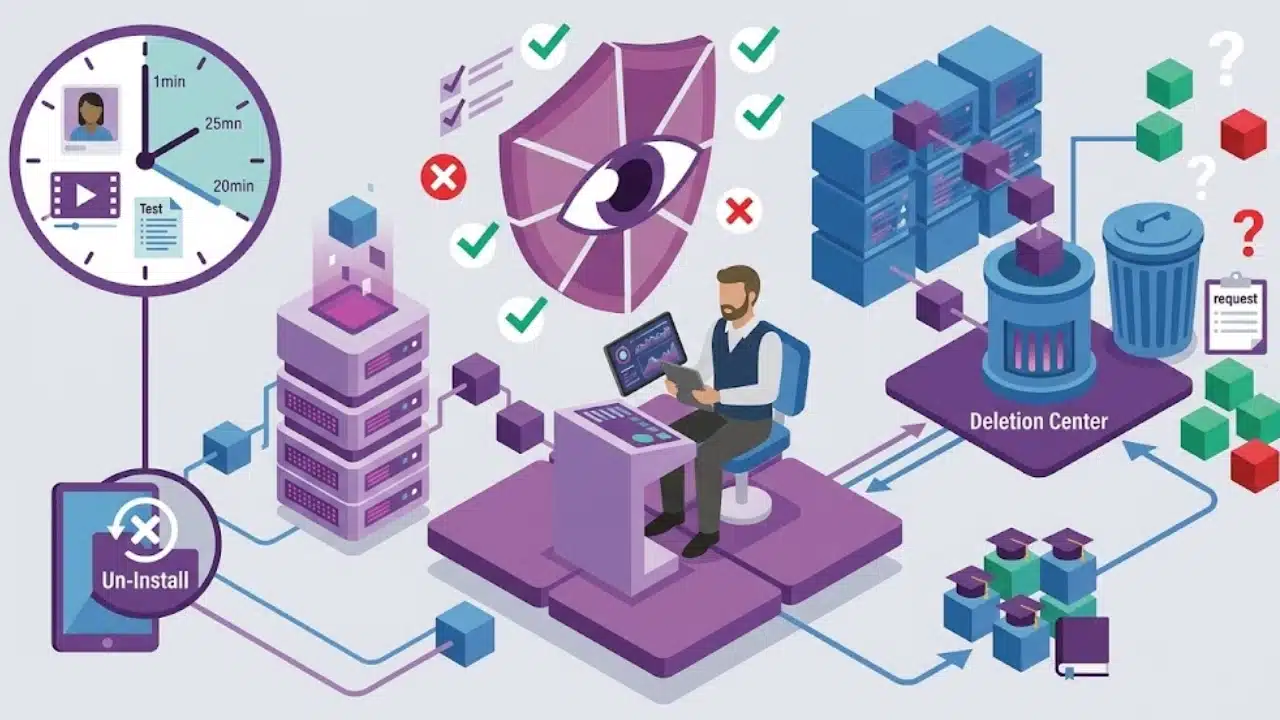
Privacy risk does not end when a child closes an app. Data retention describes how long information remains stored, while deletion covers the process for having it removed.
Uninstalling an app removes software from the device. It does not, by itself, send the company a request to erase a profile, uploaded content, activity history, or school record held on its servers.
COPPA-covered operators may keep children’s personal information only as long as reasonably necessary for the purpose for which it was collected. Parents also have rights to review information, request deletion, and prevent further use or collection.
Look for a stated retention period or a clear explanation of how that period is determined. There should also be a usable deletion tool, form, or contact address. A policy that promises deletion without explaining how to request it offers little practical help.
For school technology, someone should be responsible for closing accounts when a student leaves, completes a course, or stops using the platform. Forgotten education accounts should not become permanent archives.
The Privacy Label Is a Starting Point, Not a Safety Seal
App-store privacy labels are useful for an initial review, but they are not guarantees. Google Play requires developers to declare how their apps collect, share, and protect data, including relevant activity performed by third-party software libraries and SDKs. The developer remains responsible for the accuracy of that information. Google may review the declaration and act on discrepancies, but its process is not designed to verify every detail independently.
Compare the store label with the privacy policy, device permissions, and in-app controls. These sources answer different questions. A permission screen shows what an app can access, while a data safety disclosure focuses more heavily on information collected or shared beyond the device.
Data privacy terms for parents are most useful when considered together. Reasonable collection can still be paired with excessive retention. Helpful personalization can sit beside advertising practices that offer the child no meaningful benefit.
Final Thoughts
Parents do not need to read every privacy policy from beginning to end. Start with four points: what the app collects, why it needs the information, who else receives it, and how deletion works.
If those answers are missing, contradictory, or unnecessarily broad, pause before granting access. Knowing the main data privacy terms for parents will not remove every risk, but it makes weak privacy choices much easier to recognize.
Frequently Asked Questions (FAQs)
Does COPPA protect every child under 18?
No. COPPA primarily covers children under 13. Teenagers may receive protection through state laws, education rules, broader privacy laws, or platform policies, but COPPA itself is not a general privacy law for everyone under 18.
Should parents reject every app that uses analytics?
Not automatically. Limited analytics can help developers identify crashes, measure performance, or improve a feature. The more important questions are what information is collected, whether it identifies the child, how long it is kept, and whether it is reused for profiling or advertising.
Does deleting an account remove every copy immediately?
Not always. A provider may use backups or retain limited records for valid legal or security reasons. Its policy should explain what deletion covers and how long the process may take.
Can a school consent to an educational app for parents?
Sometimes. Under COPPA, a school may act on a parent’s behalf when collection serves the school’s educational purpose and no unrelated commercial purpose. The service operator remains responsible for complying with the rule.























 English (US) ·
  French (CA) ·
  French (FR) ·